Managing large volumes of interconnected GRC records is typically painful. Users often rely on spreadsheets to manage controls, requirements, mappings, or entire libraries before bringing them into a centralized platform. The challenge is building an import process that is flexible enough to support complex hierarchies, easy enough for non-technical users, and reliable enough to ensure correct tenant scoping and data validation.
Most systems only allow basic CSV imports or clunky multi-step wizards, which forces users to manipulate files manually or run several uploads until the data “finally works.” What’s really needed is something that behaves like a spreadsheet editor, validates itself, and supports both imports and updates without forcing users into rigid templates.
What Needs to Be Done
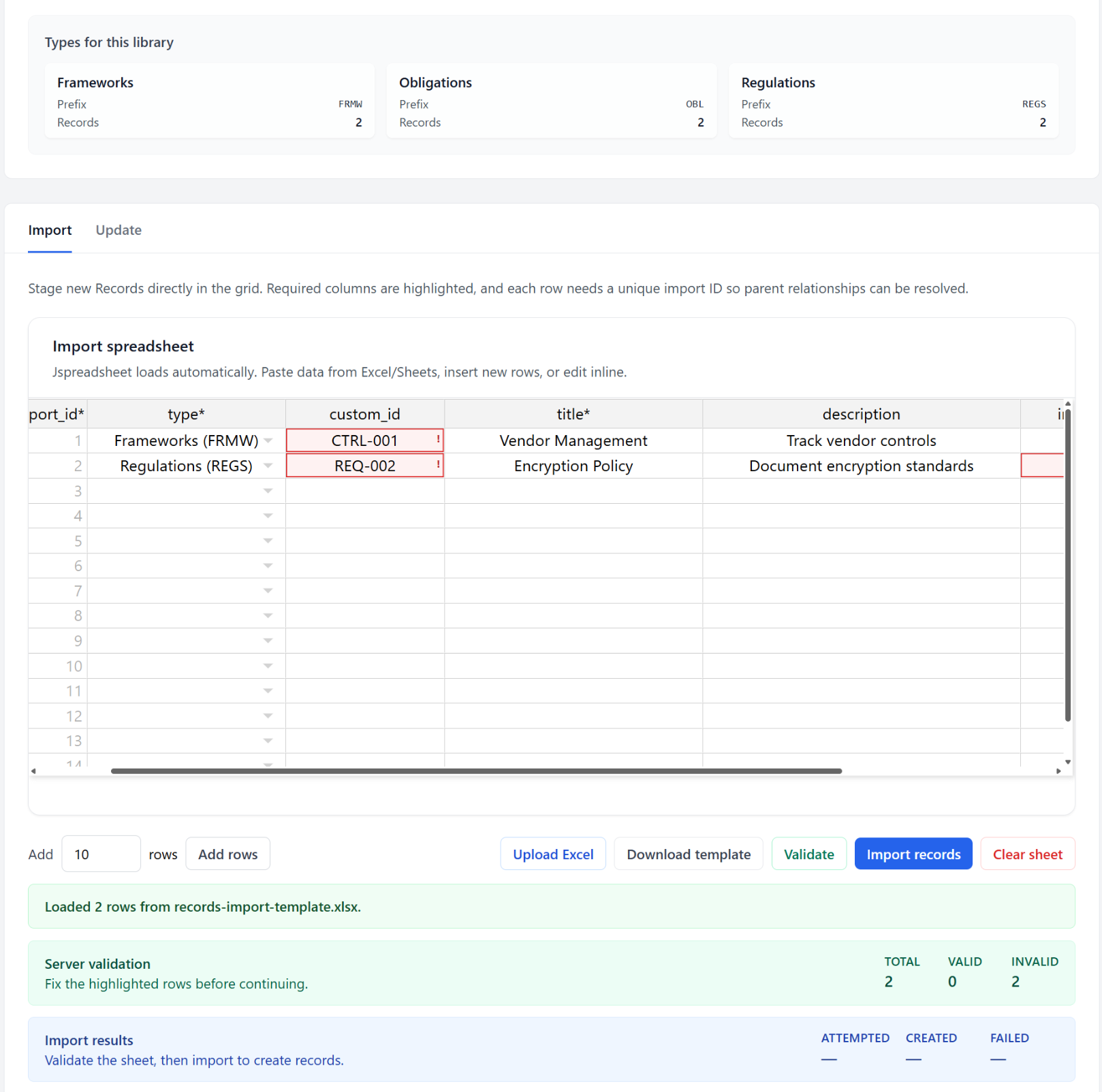
The goal is to create a modern, user-friendly spreadsheet import tool that integrates directly into the GRC platform and supports both adding new records and updating existing ones. Instead of forcing users to prepare files elsewhere, they should be able to work on their dataset directly inside the browser using a familiar Excel-like UI powered by JSpreadsheet.
When launching the import page from any Library, the system should automatically infer which Library the user is working in, preselect it, and guide them visually by showing the available Types to choose from. Users should be able to flip between two modes—Import and Update—using tabs. The Import tab focuses on creating new records, including parent-child relationships, while the Update tab focuses on making changes to existing records using their custom IDs.
A drag-and-drop or file-selector upload should allow users to load Excel or CSV files automatically. Once uploaded, the file is parsed into the spreadsheet editor, where the user can review, fix errors, add rows, or fill in missing values. Validation should occur both client-side and server-side. Client-side validation catches basic issues early—like missing required fields or invalid parent IDs—while server-side validation ensures the tenant, library, type, and custom ID logic are correct before changes ever hit the database.
Import execution must respect record hierarchies. Children cannot be created before parents, and parent types must match child types. Updates must respect the tenant and library boundaries so no user can modify data belonging to another client. Finally, the system must log all changes, showing how many records were created, updated, or skipped, while providing detailed, row-level error messages if something fails.
To make this practical for real-world users, the page should also allow downloading CSV templates, adding rows automatically, and saving the validation or import summary for audit purposes. All of this must work without breaking the existing record-creation process and must integrate with the platform’s multi-tenant logic, prefix generation, and activity logs.
Functional Specification & Implementation Plan
Scope
This feature adds a full Excel/CSV-driven import/update system for GRC Records, integrated with a browser-based spreadsheet (JSpreadsheet) and backed by robust validation and multi-tenant data controls. It covers:
- Importing new records
- Updating existing records
- Parent-child hierarchy creation
- Excel or CSV uploads
- Interactive spreadsheet editing
- Client and server-side validation
- Execution engine for applying changes
- Activity logging
- Strict tenant + library scoping
Implementation Plan
1. UI and Routing
- Add a “Spreadsheet Import” button to the Records index page.
- Route leads to
/records/import?library_id=X. - Create a Livewire component handling both Import and Update tabs.
- Preselect Library based on origin, allow switching.
- Show Type list for selected Library.
2. Page Layout
- Left column contains:
- Library dropdown
- Type helper panel
- Basic instructions
- Right side contains tab switcher:
- Tab 1: Import
- Tab 2: Update
3. JSpreadsheet Setup
Import Tab Columns
- import_id (required, numeric, auto-filled)
- type (required, dropdown)
- custom_id (optional)
- title (required)
- description (optional)
- import_parent_id (optional)
- parent_custom_id (optional)
Update Tab Columns
- custom_id (required)
- title (optional)
- description (optional)
4. CSV/XLSX Upload + Parsing
Use maatwebsite/excel for parsing Excel or CSV files.
Workflow:
- User uploads file
- Backend parses rows
- Header validation
- Rows returned as JSON to the browser
- Data replaces spreadsheet content
- Invalid headers return a clear error message
5. Client-Side Validation
- Required fields cannot be empty
- Duplicate import_id flagged
- Invalid types flagged
- import_parent_id must match a valid import_id
- Duplicate custom_id within same sheet flagged
- Highlight invalid cells with red borders
- Provide tooltip-style messages
6. Server-Side Validation (Dry Run)
Triggered from a Validate button.
Backend validation checks:
- Required columns exist
- Type belongs to selected Library
- custom_id uniqueness (existing + current sheet)
- Parent-child type match
- parent_custom_id must refer to an existing record within tenant+library
- import_parent_id must exist in submitted sheet
Backend returns:
- Per-row error list
- Summary counts
- Individual messages tied to row + column keys
7. Import Execution
Triggered only after successful validation.
Execution rules:
- Sort rows so parents are created before children
- Custom IDs generated when missing
- Parent resolved via import_parent_id or parent_custom_id
- Insert Records with tenant_id, library_id, type_id, prefix
- Capture errors per row
- Return: created_count, skipped_count, error_list
8. Update Execution
- Look up Record using custom_id + tenant_id + library_id
- Update only filled fields
- Handle missing or deleted records gracefully
- Return summary of updated, skipped, failed
9. Activity Logging
- Log high-level summary:
- User
- Tenant
- Library
- Import or Update
- Counts
- Timestamp
- Optionally store uploaded file name or parsed JSON snapshot
10. Security & Scoping
- All operations enforce:
- tenant_id from authenticated session
- selected library_id
- Never read or modify records outside the tenant
- Prevent cross-library updates
11. Optional Enhancements
- “Show only error rows” filter
- Undo per row
- Saving import jobs for later review
- Email summary after large imports
- Queue-based processing for huge files
Conclusion
This approach transforms the typical CSV import nightmare into an intuitive, Excel-like interface that works directly inside the GRC system. It respects tenant boundaries, handles hierarchical records, gives immediate validation feedback, and provides a smooth workflow whether users are adding new content or updating existing libraries. With the combination of JSpreadsheet on the frontend and maatwebsite/excel on the backend, the system becomes both powerful and easy to use—giving users full control over their data without forcing them to fight the import process.
Leave a Reply